Standalone Activities - .NET SDK
Temporal .NET SDK support for Standalone Activities is at Pre-release.
All APIs are experimental and may be subject to backwards-incompatible changes.
Standalone Activities are Activities that run independently, without being orchestrated by a Workflow. Instead of starting an Activity from within a Workflow Definition, you start a Standalone Activity directly from a Temporal Client.
The way you write the Activity and register it with a Worker is identical to Workflow Activities. The only difference is that you execute a Standalone Activity directly from your Temporal Client.
This page covers the following:
- Get Started with Standalone Activities
- Define your Activity
- Run a Worker with the Activity registered
- Execute a Standalone Activity
- Start a Standalone Activity without waiting for the result
- Get a handle to an existing Standalone Activity
- Wait for the result of a Standalone Activity
- List Standalone Activities
- Count Standalone Activities
- Run Standalone Activities with Temporal Cloud
This documentation uses source code from the StandaloneActivity sample.
Get Started with Standalone Activities
Prerequisites:
-
Install the Temporal CLI (Standalone Activity Prerelease version)
-
Temporal .NET SDK ( version X.Y.Z or higher). See the .NET Quickstart for install instructions.
The first step in running a Standalone Activity involves starting a Temporal server:
temporal server start-dev
This command automatically starts the Temporal development server with the Web UI, and creates the default Namespace.
It uses an in-memory database, so do not use it for real use cases.
All code samples on this page use
ClientEnvConfig.LoadClientConnectOptions()
to configure the Temporal Client connection. It responds to environment
variables and TOML configuration
files, so the same code works against a local dev
server and Temporal Cloud without changes. See Run Standalone Activities with Temporal
Cloud below.
The Temporal Server will now be available for client connections on localhost:7233, and the
Temporal Web UI will now be accessible at http://localhost:8233. Standalone
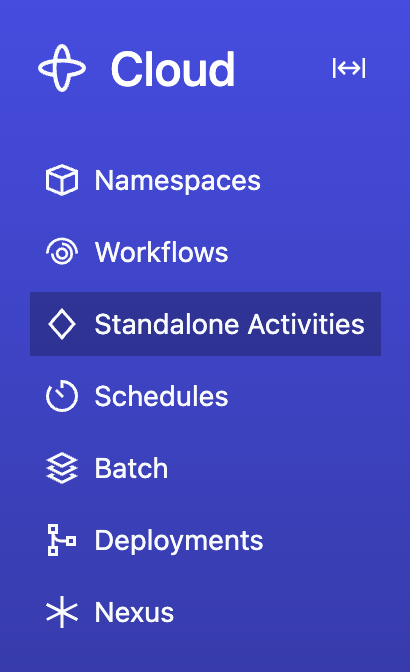
Activities are available from the nav bar item located towards the top left of the page:
Clone the samples-dotnet repository to follow along:
git clone https://github.com/temporalio/samples-dotnet.git
cd samples-dotnet
The sample project is structured as follows:
src/StandaloneActivity/
├── MyActivities.cs
├── Program.cs
├── README.md
└── TemporalioSamples.StandaloneActivity.csproj
Define your Activity
An Activity in the Temporal .NET SDK is a method decorated with the [Activity] attribute. The way
you write a Standalone Activity is identical to how you write an Activity orchestrated by a Workflow.
In fact, the same Activity can be executed both as a Standalone Activity and as a Workflow Activity.
src/StandaloneActivity/MyActivities.cs
namespace TemporalioSamples.StandaloneActivity;

using Temporalio.Activities;

public static class MyActivities
{
    [Activity]
    public static Task<string> ComposeGreetingAsync(ComposeGreetingInput input) =>
        Task.FromResult($"{input.Greeting}, {input.Name}!");
}

public record ComposeGreetingInput(string Greeting, string Name);
Run a Worker with the Activity registered
Running a Worker for Standalone Activities is the same as running a Worker for Workflow Activities — you create a Worker, register the Activity, and run the Worker. The Worker doesn't need to know whether the Activity will be invoked from a Workflow or as a Standalone Activity. See How to develop a Worker for more details on Worker setup and configuration options.
src/StandaloneActivity/Program.cs (worker command)
using Microsoft.Extensions.Logging;
using Temporalio.Client;
using Temporalio.Common.EnvConfig;
using Temporalio.Worker;
using TemporalioSamples.StandaloneActivity;

var connectOptions = ClientEnvConfig.LoadClientConnectOptions();
connectOptions.TargetHost ??= "localhost:7233";
connectOptions.LoggerFactory = LoggerFactory.Create(builder =>
    builder.
        AddSimpleConsole(options => options.TimestampFormat = "[HH:mm:ss] ").
        SetMinimumLevel(LogLevel.Information));
var client = await TemporalClient.ConnectAsync(connectOptions);

const string taskQueue = "standalone-activity-sample";

using var tokenSource = new CancellationTokenSource();
Console.CancelKeyPress += (_, eventArgs) =>
{
    tokenSource.Cancel();
    eventArgs.Cancel = true;
};

using var worker = new TemporalWorker(
    client,
    new TemporalWorkerOptions(taskQueue).
        AddActivity(MyActivities.ComposeGreetingAsync));

await worker.ExecuteAsync(tokenSource.Token);
Run the Worker (in a separate terminal):
dotnet run --project src/StandaloneActivity worker
Execute a Standalone Activity
Use
client.ExecuteActivityAsync()
to execute a Standalone Activity and wait for the result. Call this from your application code, not
from inside a Workflow Definition. This durably enqueues your Standalone Activity in the Temporal
Server, waits for it to be executed on your Worker, and then returns the result.
src/StandaloneActivity/Program.cs (execute-activity command)
using Temporalio.Client;
using Temporalio.Common.EnvConfig;
using TemporalioSamples.StandaloneActivity;

var connectOptions = ClientEnvConfig.LoadClientConnectOptions();
connectOptions.TargetHost ??= "localhost:7233";
var client = await TemporalClient.ConnectAsync(connectOptions);

var result = await client.ExecuteActivityAsync(
    () => MyActivities.ComposeGreetingAsync(new ComposeGreetingInput("Hello", "World")),
    new("standalone-activity-id", "standalone-activity-sample")
    {
        ScheduleToCloseTimeout = TimeSpan.FromSeconds(10),
    });
Console.WriteLine($"Activity result: {result}");
You can pass the Activity as either a lambda expression or a string Activity type name:
// Using a lambda expression (type-safe)
var result = await client.ExecuteActivityAsync(
    () => MyActivities.ComposeGreetingAsync(new ComposeGreetingInput("Hello", "World")),
    new("my-activity-id", "my-task-queue")
    {
        ScheduleToCloseTimeout = TimeSpan.FromSeconds(10),
    });

// Using a string type name
var result = await client.ExecuteActivityAsync<string>(
    "ComposeGreeting",
    new object?[] { new ComposeGreetingInput("Hello", "World") },
    new("my-activity-id", "my-task-queue")
    {
        ScheduleToCloseTimeout = TimeSpan.FromSeconds(10),
    });
StartActivityOptions requires Id, TaskQueue, and at least one of ScheduleToCloseTimeout or
StartToCloseTimeout. See
StartActivityOptions
in the API reference for the full set of options.
Run it (with the Worker running in another terminal):
dotnet run --project src/StandaloneActivity execute-activity
Or use the Temporal CLI:
temporal activity execute \
  --type ComposeGreeting \
  --activity-id standalone-activity-id \
  --task-queue standalone-activity-sample \
  --schedule-to-close-timeout 10s \
  --input '{"Greeting": "Hello", "Name": "World"}'
Start a Standalone Activity without waiting for the result
Use
client.StartActivityAsync()
to start a Standalone Activity and get a handle without waiting for the result:
src/StandaloneActivity/Program.cs (start-activity command)
using Temporalio.Client;
using Temporalio.Common.EnvConfig;
using TemporalioSamples.StandaloneActivity;

var connectOptions = ClientEnvConfig.LoadClientConnectOptions();
connectOptions.TargetHost ??= "localhost:7233";
var client = await TemporalClient.ConnectAsync(connectOptions);

var handle = await client.StartActivityAsync(
    () => MyActivities.ComposeGreetingAsync(new ComposeGreetingInput("Hello", "World")),
    new("standalone-activity-id", "standalone-activity-sample")
    {
        ScheduleToCloseTimeout = TimeSpan.FromSeconds(10),
    });
Console.WriteLine($"Started activity: {handle.Id}");

// Wait for the result later
var result = await handle.GetResultAsync();
Console.WriteLine($"Activity result: {result}");
Run it (with the Worker running in another terminal):
dotnet run --project src/StandaloneActivity start-activity
Or use the Temporal CLI:
temporal activity start \
  --type ComposeGreeting \
  --activity-id standalone-activity-id \
  --task-queue standalone-activity-sample \
  --schedule-to-close-timeout 10s \
  --input '{"Greeting": "Hello", "Name": "World"}'
Get a handle to an existing Standalone Activity
Use client.GetActivityHandle() to create a handle to a previously started Standalone Activity:
// Without a known result type
var handle = client.GetActivityHandle("my-activity-id", runId: "the-run-id");

// With a known result type
var typedHandle = client.GetActivityHandle<string>("my-activity-id", runId: "the-run-id");
You can use the handle to wait for the result, describe, cancel, or terminate the Activity.
Wait for the result of a Standalone Activity
Under the hood, calling client.ExecuteActivityAsync() is the same as calling
client.StartActivityAsync() to durably enqueue the Standalone Activity, and then calling
await handle.GetResultAsync() to wait for the Activity to be executed and return the result:
var result = await handle.GetResultAsync();
List Standalone Activities
Use
client.ListActivitiesAsync()
to list Standalone Activity Executions that match a List Filter query. The result is
an IAsyncEnumerable that yields ActivityExecution entries.
src/StandaloneActivity/Program.cs (list-activities command)
using Temporalio.Client;
using Temporalio.Common.EnvConfig;

var connectOptions = ClientEnvConfig.LoadClientConnectOptions();
connectOptions.TargetHost ??= "localhost:7233";
var client = await TemporalClient.ConnectAsync(connectOptions);

await foreach (var info in client.ListActivitiesAsync(
    "TaskQueue = 'standalone-activity-sample'"))
{
    Console.WriteLine(
        $"ActivityID: {info.ActivityId}, Type: {info.ActivityType}, Status: {info.Status}");
}
Run it:
dotnet run --project src/StandaloneActivity list-activities
Or use the Temporal CLI:
temporal activity list
The query parameter accepts the same List Filter syntax used for Workflow
Visibility. For example, "ActivityType = 'ComposeGreeting' AND Status = 'Running'".
Count Standalone Activities
Use
client.CountActivitiesAsync()
to count Standalone Activity Executions that match a List Filter query.
src/StandaloneActivity/Program.cs (count-activities command)
using Temporalio.Client;
using Temporalio.Common.EnvConfig;

var connectOptions = ClientEnvConfig.LoadClientConnectOptions();
connectOptions.TargetHost ??= "localhost:7233";
var client = await TemporalClient.ConnectAsync(connectOptions);

var resp = await client.CountActivitiesAsync(
    "TaskQueue = 'standalone-activity-sample'");
Console.WriteLine($"Total activities: {resp.Count}");
Run it:
dotnet run --project src/StandaloneActivity count-activities
Or use the Temporal CLI:
temporal activity count
Run Standalone Activities with Temporal Cloud
The code samples on this page use ClientEnvConfig.LoadClientConnectOptions(), so the same code
works against Temporal Cloud — just configure the connection via environment variables or a TOML
profile. No code changes are needed.
For full details on connecting to Temporal Cloud, including Namespace creation, certificate generation, and authentication options, see Connect to Temporal Cloud.
Connect with mTLS
export TEMPORAL_ADDRESS=<your-namespace>.<your-account-id>.tmprl.cloud:7233
export TEMPORAL_NAMESPACE=<your-namespace>.<your-account-id>
export TEMPORAL_TLS_CLIENT_CERT_PATH='path/to/your/client.pem'
export TEMPORAL_TLS_CLIENT_KEY_PATH='path/to/your/client.key'
Connect with an API key
export TEMPORAL_ADDRESS=<region>.<cloud_provider>.api.temporal.io:7233
export TEMPORAL_NAMESPACE=<your-namespace>.<your-account-id>
export TEMPORAL_API_KEY=<your-api-key>
Then run the Worker and starter code as shown in the earlier sections.